One system, from engagement to filed return
Tax software that checks its own work.
When it's you, or you and a few people, there's no second reviewer waiting behind you. Crosstie ties every figure back to where it came from and tells you exactly what doesn't tie. When it can't stand behind a number, it stops and says why instead of guessing.
Two products: Crosstie Practice runs the firm, and Crosstie Tax files the return. Both include the workpaper that checks every figure. Use either one alongside what you already have, or both as one system.
Live · what other practice software doesn't do
Built for the way a small firm actually runs
Which clients are costing you money
Every engagement's real hourly rate from the time actually spent, and what to charge each client at renewal. The price is built step by step so you can check the arithmetic.
LiveCross-selling, suggested for you
Services each client could use but doesn't have yet, with the reason: bookkeeping for a sole proprietor, planning for a landlord, payroll for a corporation. One click drafts the addendum for them to sign.
LiveOrganizers that feed the return
Questions that follow the client's situation, answered over several sittings. Filing status, dependents and ages go straight into the workpaper. Nobody retypes them.
LiveTime that tracks itself
Work in a client's file and the time is recorded against the engagement, sorted by what you were doing. It pauses when you step away, and you confirm each block before it's logged.
Two products, one system
Crosstie Practice and Crosstie Tax
Crosstie runs a tax practice end to end. Clients sign, pay and upload documents in one portal. Those documents build a workpaper that ties every figure to its source and stops rather than guessing. The workpaper then feeds the return — no re-keying, no second system, nothing lost in between.
Crosstie Practice runs the firm. Crosstie Tax prepares and files the return. Workpapers are included in both: client documents are read into a checked workpaper, at no extra charge. Each product stands alone, and they're better together. Crosstie Tax coming soon
Crosstie Practice
Run the firm from one place: clients, engagements, documents, deadlines and billing. Keep the tax software you use today. Crosstie Practice works alongside it.
Organizers that feed the return
In most products the organizer is a form the client fills in and someone retypes. Here the answers go straight into the workpaper.
- Built for each engagement: a document checklist and questions that follow the client's situation — a mortgage, rent, a 529 plan, school costs — so they answer only what applies.
- Done in several sittings: on a phone or a computer, with every answer and upload saved as they go, picking up where they left off.
- Answers that reach the return: filing status, dependents and ages feed the computation directly. Nothing is keyed twice.
- Reminders that know when to stop: outstanding items are chased after 3, 7 and 14 days, every 2 days near the deadline, then handed to you rather than nagging forever.
Client portal
- One place for the client: uploads by photo or PDF, questions, open-items requests, and the delivered return to review and approve.
- Duplicate and corrected documents: the same file uploaded twice is caught, and a corrected form replaces the original only after you accept it.
Engagement letters, e-signatures and payments
- Engagement letters signed online, with the scope and fee recorded. Adding a service later is an addendum the client signs.
- E-signatures for any document you send for signature, such as a proposal.
- Paid when they sign: in full, or billed monthly or annually by card.
- Access tied to payment: if a payment fails, the portal pauses new work until it's settled. The client can still see and download their records.
- Service packages: quote from your own tiers, with a price for each service on its own and a credit when it's bundled.
Time, WIP and pricing
- Which clients are costing you money, and what to charge them next year. From the time actually spent, each engagement's real hourly rate, and a list of what to reprice at renewal. Each new price is built from hours at your target rate, the cost to file, a margin adjustment and tax, with every step shown so you can check the arithmetic.
- Time that tracks itself. Work in a client's file and your time is recorded, sorted by what you were doing, and carried to the engagement's WIP. No one has to remember to start a timer. It pauses when you step away, and you confirm each block before it's logged.
- Cross-selling, suggested for you: services each client could use but doesn't have yet, with the reason — bookkeeping for a sole proprietor, planning for a landlord, payroll for a corporation. One click drafts an addendum to their engagement letter.
Documents and workflow
- Domestic and international file rooms. The engagement letter asks for the client's consent to international preparation (IRC §7216). Their files go to the international file room only if they consent, and to the domestic one otherwise.
- Mark up PDFs in the client's file, and export the marked-up copy.
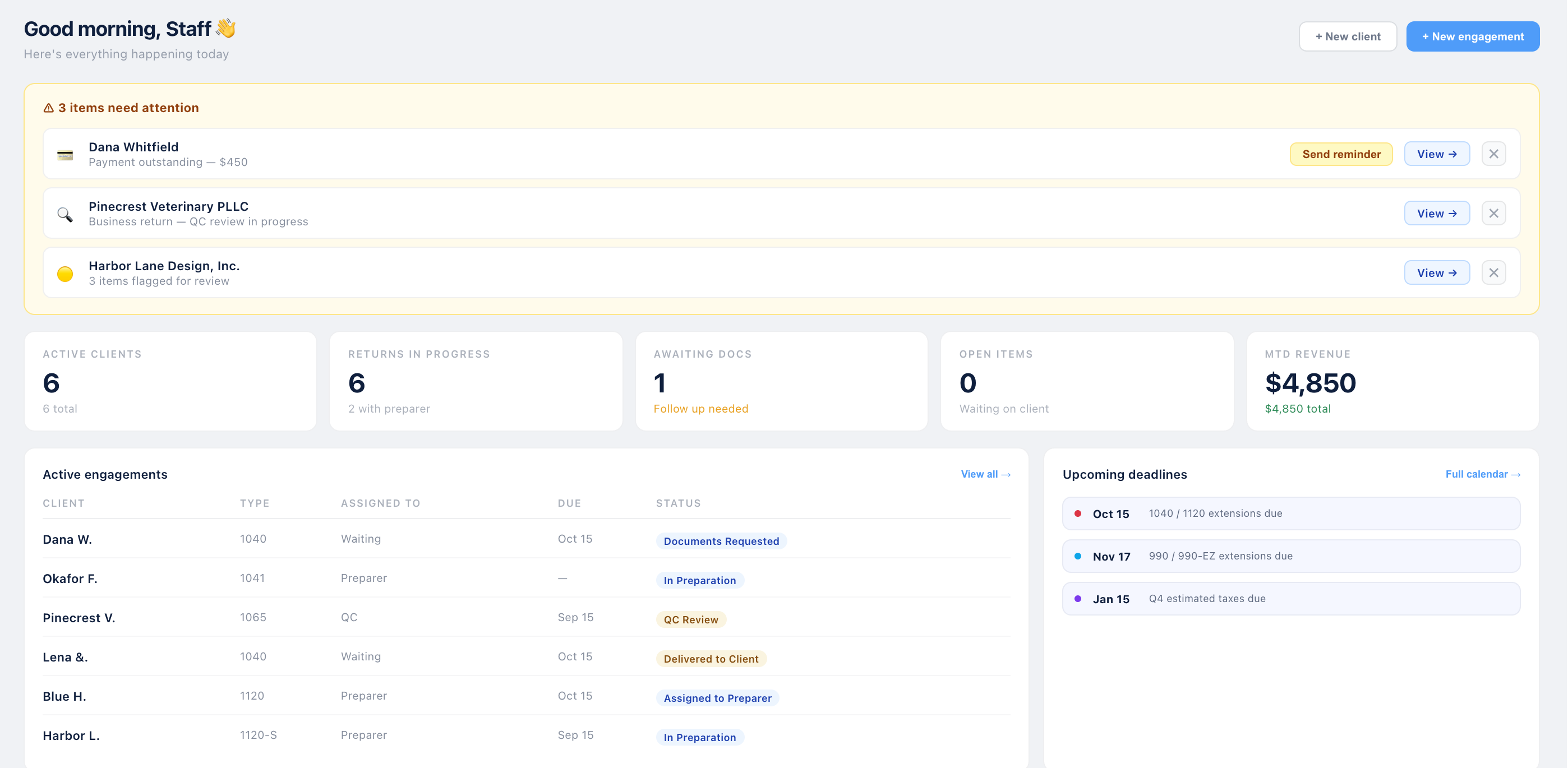
- One view of the day: what needs attention, what's waiting on the client, and what's due.
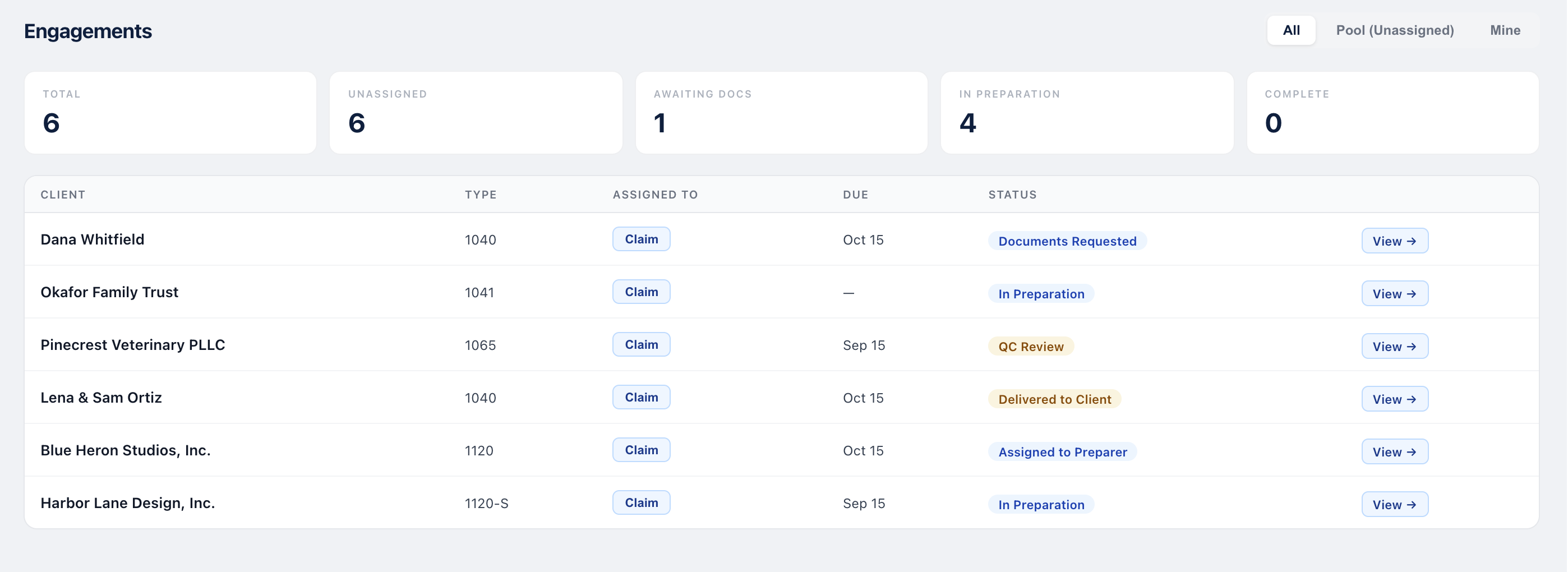
- Every return's status, from documents requested to delivered, with deadlines by entity type.
- IRS notices logged against the client, with their response deadlines and status.
- Estimated tax payments: quarterly amounts recorded and reminders sent before each due date.
- Team roles and seats: preparer, reviewer, partner and admin, with sign-off levels set by role and a seat for each active user.
Coming soon
- E-signature for Form 8879, with the identity verification (knowledge-based authentication) the IRS requires for a remote signature.
- Export to the tax software you already use, so a firm that keeps its own software doesn't key the workpaper again.
Pricing, in short: one plan, priced per user per month. Everything is included, workpapers too. The only paid add-on will be accounting, which is still in development.
Workpapers, included in both
The workpaper comes with Crosstie Practice and with Crosstie Tax, at no extra charge. Client documents are read into it, every figure traces to its source, and nothing is computed on a guess. With Crosstie Practice alone, you keep your own tax software and prepare the return there.
Coming soon Exporting a finished workpaper into the tax software you already use, so nothing is keyed twice.
- Incomplete, never confidently wrong. A figure that can't be supported isn't computed. You get the reason instead of a number.
- Tie-outs. The return's key totals checked against the workpaper. A difference ties only when it's explained.
- Entries that know the entity. Suggested from the client's ledger, and sorted into book, reclassification and tax-only entries, with book-tax differences carried to Schedule M-1.
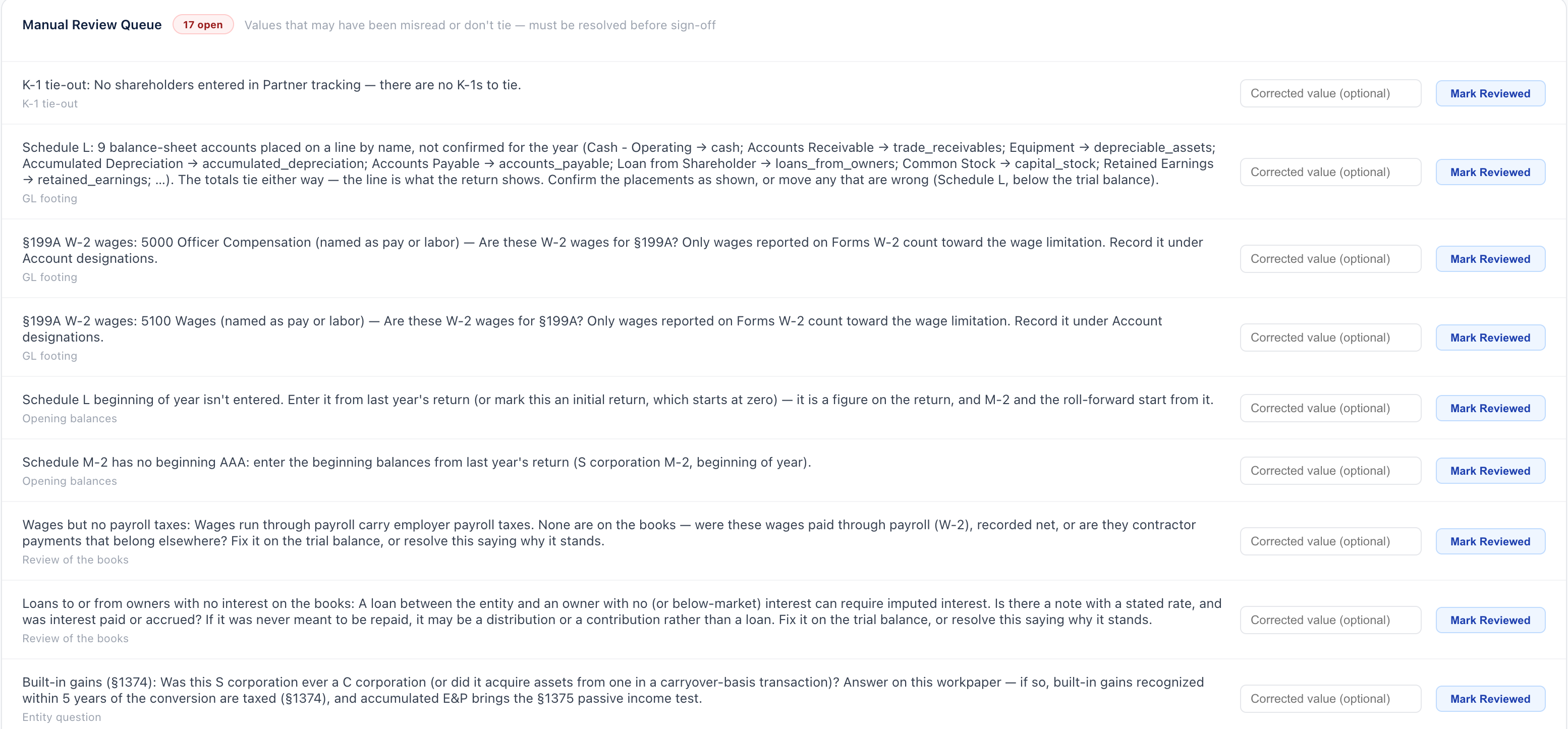
- A review queue sign-off can't skip. Everything unresolved stays open until it's fixed or answered with a reason.
- Sign-off at every level you choose: preparer, reviewer and partner in order, each freezing the workpaper. If one person signs two levels, the file says so, rather than presenting it as an independent review.


Crosstie Tax
The filing engine, with workpapers included. The return is prepared from the workpaper and filed, with no export and no second system. It's in development: Crosstie isn't yet authorized to e-file with the IRS, and no date has been set.
Work on the return itself
- On the form, not a questionnaire. You prepare on a replica of the IRS form, line by line, the way returns are reviewed.
- Every line says how it got there: keyed by hand, calculated, carried from another form or the workpaper, or overridden.
- Overrides keep the calculated figure, with who changed it, when and why, so an override can be undone.
- The return comes from the workpaper, so figures aren't keyed twice and can't drift apart.
Marked DRAFT on every page until the return is filed.
State returns, beside the federal one In development
State returns are in development, and no date is set. When they're built, each state sits beside the federal return with its own diagnostics and its own e-file gate, so a clear federal return can still have a blocked state, or the other way round.
Diagnostics 012
- WarningRetirement incomePennsylvania generally doesn’t tax pension and IRA distributions received after retirement. Confirm Walter’s retirement status.
- InformationalA different starting pointPA-40 doesn’t start from federal AGI. Each class of income is carried from the same documents.
- InformationalResident creditTax paid to New York would carry to Schedule G-L once IT-203 is complete.
E-file waits for
- ✓ No blocking diagnostics
- ✕ Reviewer sign-off
- ✕ Taxpayer signature
From the federal return
- Compensation, interest, dividends and net gainsfrom the same W-2s, 1099s and 1099-B as Form 1040
- Pension, IRA and Social Securitynot taxed by Pennsylvania after retirement, to confirm
Diagnostics 100
- BlockingNew York wages not allocatedThe Lakeshore Library Foundation W-2 reports New York wages in box 16 (7,150). IT-203 needs the New York share, from days worked in New York.
E-file waits for
- ✕ 1 blocking diagnostic
- ✕ Reviewer sign-off
- ✕ Taxpayer signature
From the federal return
- Federal amount columnfrom Form 1040: AGI 103,359
- New York State amount columnNew York-source income only
Better together: one system, not two
Use them together and there's nothing to move between them. They aren't separate products joined by an integration. They're one system.
One client list
A client added in one place is there in the other, with nothing to match up or keep in sync.
No handoff
The engagement, its documents, the workpaper and the return sit together, so you pick up where you left off.
Time where the work is
Time spent in the tax work counts toward the engagement it belongs to.
Demo: from engagement to sign-off
A walk through the working software, one step at a time. Every screen is real, shown with fictional clients. Return preparation isn't part of this walk-through because it's still in development.
-
Step 1 of 5 · Live
Start the day on the dashboard
What needs attention, what's waiting on the client, and what's due. -
Step 2 of 5 · Live
Every engagement and where it stands
Each return's type, who has it, its due date and its status. -
Step 3 of 5 · Live
The workpaper raises what a reviewer would catch
Every open item stays open until it's fixed or answered with a reason. -
Step 4 of 5 · Live
Entries suggested from the client's ledger
The meals add-back and nondeductible penalties, waiting for your decision. -
Step 5 of 5 · Live
It stops instead of guessing
Tax depreciation isn't assumed to equal book. Sign-off waits until it's entered.